Accessible Canvas Math

Instructure is always improving Canvas accessibility, and the built-in equation editor tool reflects this work. The equation editor has buttons for math elements and can also take LaTeX input. The resulting equations work with screen reader software for any students who interact with Canvas via audio.

Creating Equations in Canvas Pages

There are two methods to access the Canvas Equation Editor:

  • In the menu bar above the Rich Content Editor (RCE), select Insert and then Equation.
  • Expand the toolbar using the More button (three vertical dots) and then select the button with the symbol for the Square Root of x(square root of x).

The equation editor’s main advantage over the EquatIO plug-in is that equations made with the built-in equation editor can be edited again. EquatIO’s equations cannot be edited once completed.


Canvas Editor Specific Cases

The Canvas Equation Editor does not take all LaTeX syntax, especially those that require special packages. Some specific quirks are listed below:

  • “/displaystyle{ }” might be needed if elements such as indexes or limits are displaying in-line.
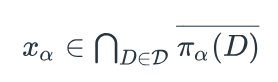
    • Without displaystyle:x_\alpha \in \bigcap_{D \in \mathcal{D}} \overline{\pi_\alpha(D)}topology example no display style; x alpha element of bigcap D element of D of overbar pi alpha of D
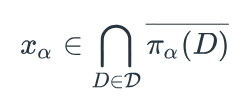
    • With displaystyle:\displaystyle{x_\alpha \in \bigcap_{D \in \mathcal{D}} \overline{\pi_\alpha(D)}}topology example with display style; x alpha element of bigcap with D element of D under bigcap, of overbar pi alpha of D
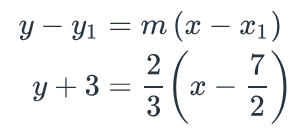
  • For systems of equations, the “align” environment works:
    \begin{align}
    y – y_1 &= m \left( x – x_1 \right)\\
    y + 3 &= \frac{2}{3} \left( x – \frac{7}{2} \right)
    \end{align}
    point-slope lines; general and specific. y minus y1 equals m open parenthesis x minus x1 close parenthesis, and y plus 3 equals two-thirds open parenthesis x minus seven-halves close parenthesis


Connect with the Instructional Accessibility Group

Have more questions or need additional assistance? Email the IAG