Request Information
Ready to find out what MSU Denver can do for you? We’ve got you covered.
Instructure is always improving Canvas accessibility, and the built-in equation editor tool reflects this work. The equation editor has buttons for math elements and can also take LaTeX input. The resulting equations work with screen reader software for any students who interact with Canvas via audio.
There are two methods to access the Canvas Equation Editor:
 ).
).The equation editor’s main advantage over the EquatIO plug-in is that equations made with the built-in equation editor can be edited again. EquatIO’s equations cannot be edited once completed.
The Canvas Equation Editor does not take all LaTeX syntax, especially those that require special packages. Some specific quirks are listed below:
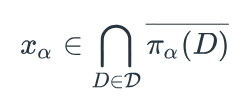
x_\alpha \in \bigcap_{D \in \mathcal{D}} \overline{\pi_\alpha(D)}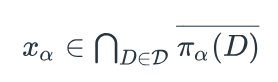
x_\alpha \in \bigcap_{D \in \mathcal{D}} \overline{\pi_\alpha(D)}}