
Request Information
Ready to find out what MSU Denver can do for you? We’ve got you covered.
Prompt engineering is the practice of writing clear, specific instructions or questions that guide a computer program to produce useful outputs. In the context of generative artificial intelligence, prompt engineering helps users communicate effectively with language models so the system can generate responses aligned with the user’s intent.
Put simply, prompt engineering is about being explicit. Just as a clear recipe leads to a better result in the kitchen, clear prompts help AI systems produce more relevant, accurate, and usable outputs.
Modern generative AI tools rely on large language models (LLMs) and natural language processing (NLP) to interpret and respond to user prompts. These models do not “understand” meaning in a human sense; instead, they generate responses based on patterns learned from large amounts of text. Well-designed prompts provide the structure and context these systems need to respond effectively.
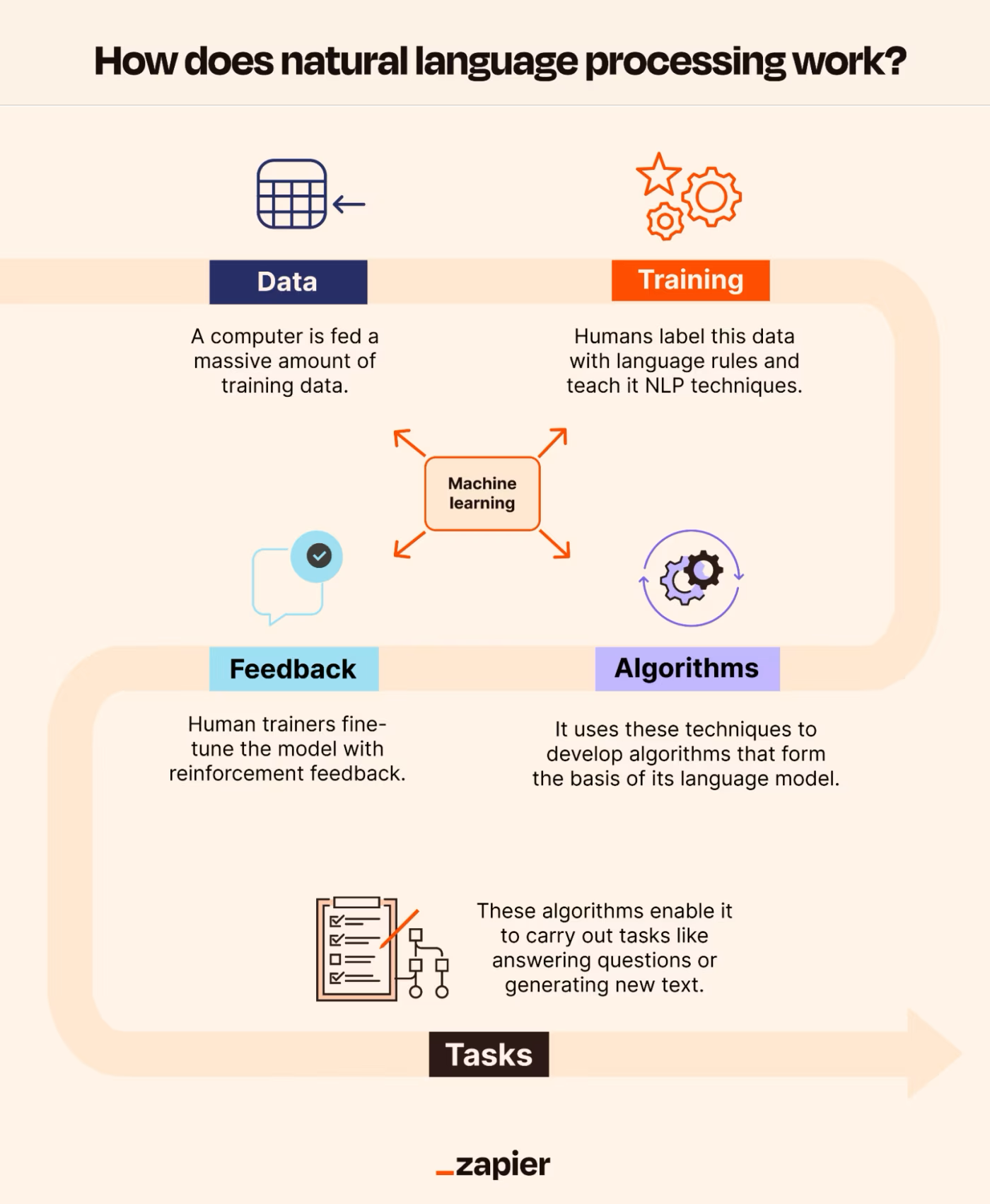
While prompt engineering can apply to many types of software and automated systems, this guide focuses on prompt engineering for language-based generative AI tools. The guidance here is most commonly used with tools such as ChatGPT and Microsoft Copilot, but the same principles apply to other language models, including those offered by Google, Meta, and other providers.
The Prompt Engineering Guide is intended for users at all experience levels, from those new to generative AI to those looking to refine more advanced prompting techniques. The guide begins with foundational concepts and moves into more structured approaches for designing effective prompts.
This guide is a living resource that will evolve as AI tools and practices change. Content will be updated over time, and user feedback is welcome. If there are examples or topics you would like to see added, contact email [email protected].
When creating prompts, there are a few parameters that users can adjust to get different results from prompts. Tweaking these settings is important to improve reliability and desirability of responses, but it takes a bit of experimentation to figure out the proper settings for use cases. Below are the common settings encountered when using different LLM providers:
A prompt can contain any of the following elements:
Here is an example of a prompt with these elements at work:
In this example of a prompt engineered to produce a sentiment analysis, the prompt had instruction (Classify the text into neutral, negative, or positive), input data (Text: I hate eating stale bread), and an output indicator (In words, tell me what the classification is).
No context was added as the language model used (ChatGPT 3.5) had sufficient training data to produce a reliable -and contextually accurate- output without any overt context necessary in the prompt. Users experimenting with other models will need to pay attention to the outputs and when/if necessary, add context in the prompt input.
Start simple when you dive into crafting prompts. It’s a process that involves a lot of trial and error to find what works best. Begin with straightforward prompts and gradually add more elements and context as you aim for improved results. Iterating on your prompt as you go is crucial.
The examples used throughout this guide are very simple, but adding more detailed instructions, more context, more data/information, and clarity in the output indicator will yield better responses and allow for the kind of prompt engineering necessary to really leverage the power of these models.
For larger tasks with multiple subtasks, consider breaking them down into simpler components. This approach prevents overwhelming complexity in the prompt design process from the outset.
Use Clear Instructions
For straightforward tasks, use clear commands like “Write,” “Classify,” “Summarize,” “Translate,” or “Order” to instruct the model.
Remember, experimentation is key to finding what works best. Try different instructions, keywords, contexts, and data to determine the optimal approach for your specific use case. Generally, the more precise and relevant the context is to your task, the better.
Some experts suggest placing instructions at the start of the prompt. Another tip is to use a distinct separator like “###” to delineate the instruction and context. Models such as ChatGPT and Copilot operate well without needing a distinct separator in the prompt, but when trying out other models, using these separators may be helpful.
Here is an example with a distinct separator that was used with ChatGPT 3.5:
Now without the separator (but also using ChatGPT 3.5):
With ChatGPT 3.5, the training (and retraining) has reached a point where direct separation is not always necessary. Users will need to test out prompts depending on the model being used to figure out when and where these separators are needed.
Be Specific
When crafting prompts, precision is key. Provide clear, detailed instructions to guide the model effectively. The more specific your prompt, the better the generated results, especially if you have a particular outcome or style in mind. While there are no magic keywords for better performance, a well-structured and descriptive prompt is crucial. Including examples within the prompt can significantly enhance the likelihood of obtaining the desired output, particularly in specific formats.
Consider the prompt’s length, as there are limitations to how much information the model can process. Balance specificity with conciseness, avoiding too many useless details that don’t contribute to the task. Experimentation and iteration are essential for fine-tuning prompts to suit your needs. Embrace the process of testing and refining to optimize prompts for your specific applications.
Avoid Being Imprecise
When considering the advice on being detailed and enhancing format, it’s tempting to get overly creative with prompts, which can lead to vague descriptions. However, it’s usually more effective to be straightforward and precise. This is akin to effective communication: the clearer and more direct the message, the better it’s understood.
Let’s take an example:
Time to clean it up:
For additional examples on basic prompting, check out this video:
Simple prompts can produce valuable results (i.e. outputs), but their effectiveness depends on the information provided and how well the prompt is crafted. A prompt typically includes instructions, questions, context, inputs, or examples to guide the model effectively and enhance result quality.
Here is a basic example of a simple prompt:
But even that simple prompt can be improved depending on the user’s needs:
Adding a bit more context in the prompt (i.e. needing a response that could be used for a children’s book) clarifies the request and allows the LLM to produce an output more specific to the request.
This process of tuning a prompt (i.e the input) to give the right instructions to the large language model (LLM) and make a valuable response (i.e. output) possible is called prompt engineering. However, just as this prompt was focused on generating words, prompts can be engineered to handle mathematical reasoning, code generation, and text summarization.
This form of prompting is known as zero-shot prompting as the user is prompting the model without including any examples or demonstrations about the task you are asking the model to complete. The ability for an LLM to handle zero-shot prompts is dependent on the model’s design and knowledge (i.e. the data it has been trained on). In other words, experiment with different models to see how they handle zero-shot prompts.
Few-shot prompting involves the inclusion of examples (sometimes called demonstrations) in the prompt. A user would use few-shot prompting when the examples provide the context or framework they want the LLM to use when creating a response.
Here is an example of a few-shot prompt:
In this example, the prompt established the rules for sentiment analysis with these rules then used to appropriately answer the question, “What is ‘Dogs are amazing’?”
Few-shot prompts make in-context learning possible for the model, giving the language model the ability to learn the task being prompted based on the demonstrations/examples added to the prompt.
Now that the basics have been covered, we will turn to DAIR.AI, a non-profit committed to “democratizing AI research, education, and technologies” and “enable the next generation of AI innovators and creators,” for information on additional prompt engineering approaches.
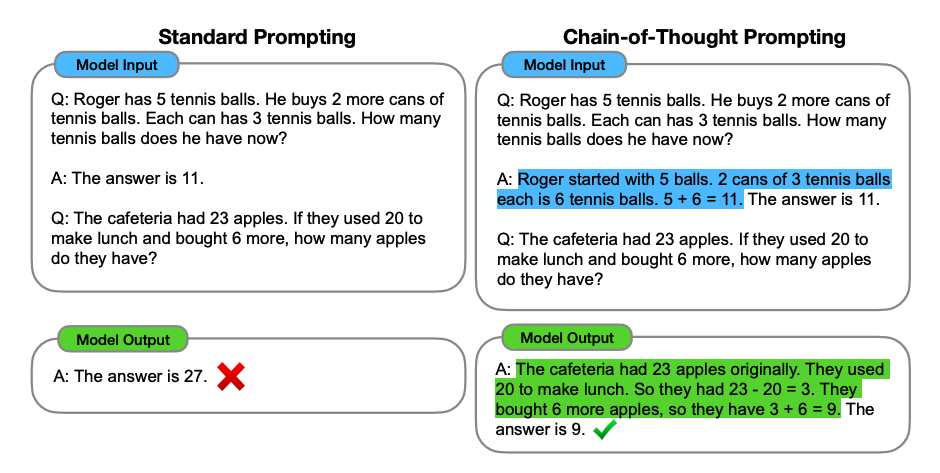
Chain of Thought (CoT) Prompting
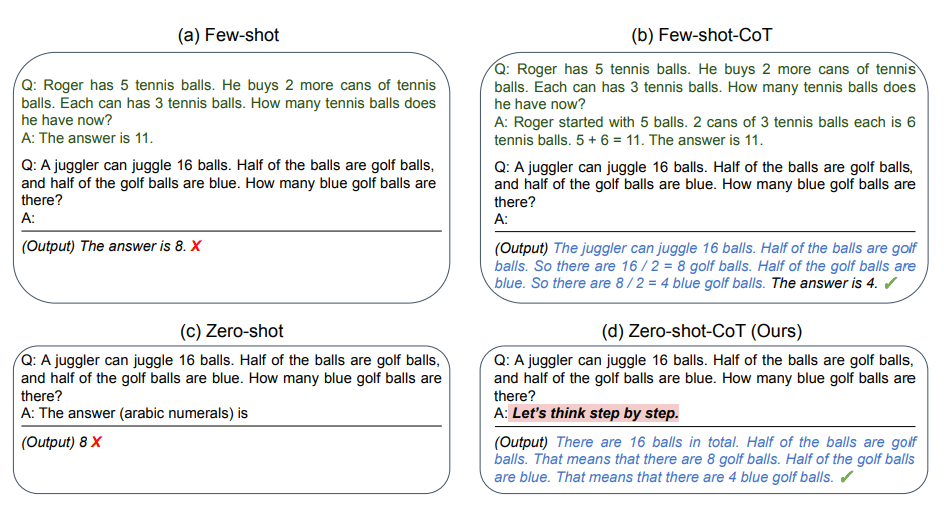
Zero-Shot CoT Prompting
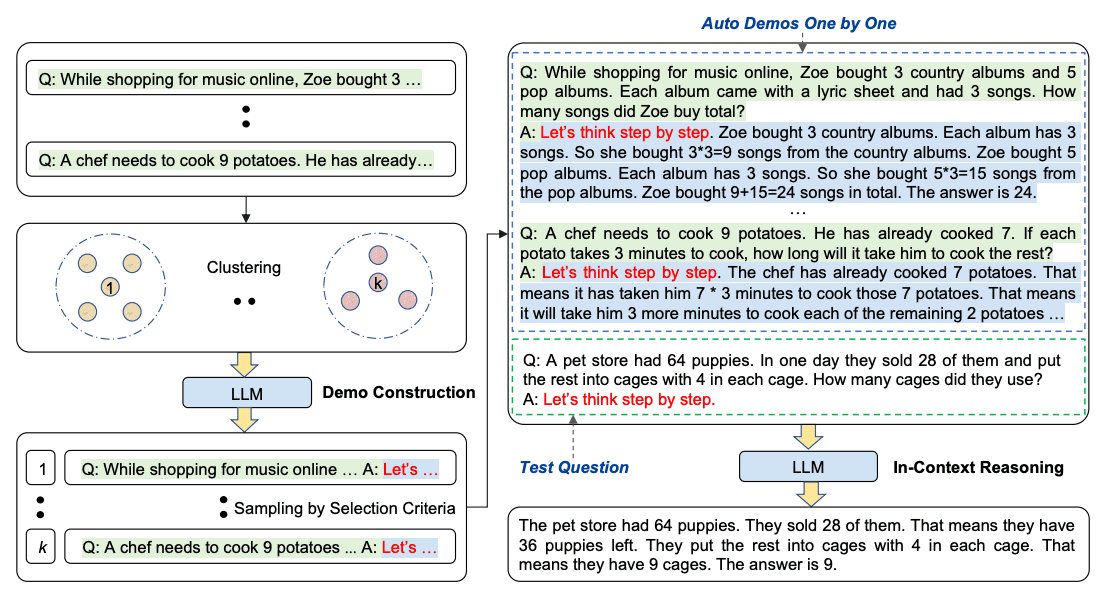
Automatic CoT Prompting
Auto-CoT consists of two main stages:
Here’s an example:
For those looking to experiment more with advanced prompting, DAIR.AI has assembled some fantastic examples applicable to all models.
Check out the Techniques area of their prompt engineering wiki.
Once ready to take things up a notch, DAIR.AI has also developed excellent how-to videos and guides on leveraging prompt engineering for data analysis, including support on how to use models to evaluate and assess data, how to visualize data, and how to handle unstructured data.
Both the Applications and Prompt Hub areas of their wiki offer step-by-step guide on using prompts to gain valuable insight into data as well as how to do things that prompt engineering for coding (a great place to start for the most inexperienced of coders).